

How to Host an ASA Dedicated Server
Run one ARK: Survival Ascended map on your own PC, with your own rates, mods and admin rights. Studio Wildcard gives the server away for free, for Windows.
What you need
A 64-bit Windows PC that stays on while people play, and SteamCMD, Valve's free command-line tool for downloading Steam servers. The server is Steam app 2430930, a 12.2 GB download with an anonymous login: that PC needs no copy of the game and no Steam account.
ARK is heavy. The Island with nobody online takes 3 to 4 minutes to start on a 12-core PC and then uses about 9.5 GB of RAM. Each map runs as its own server.
There is no native Linux version. On Linux the Windows server runs under Proton or Wine, usually through a community Docker image. Many of these start it with -NoBattlEye.
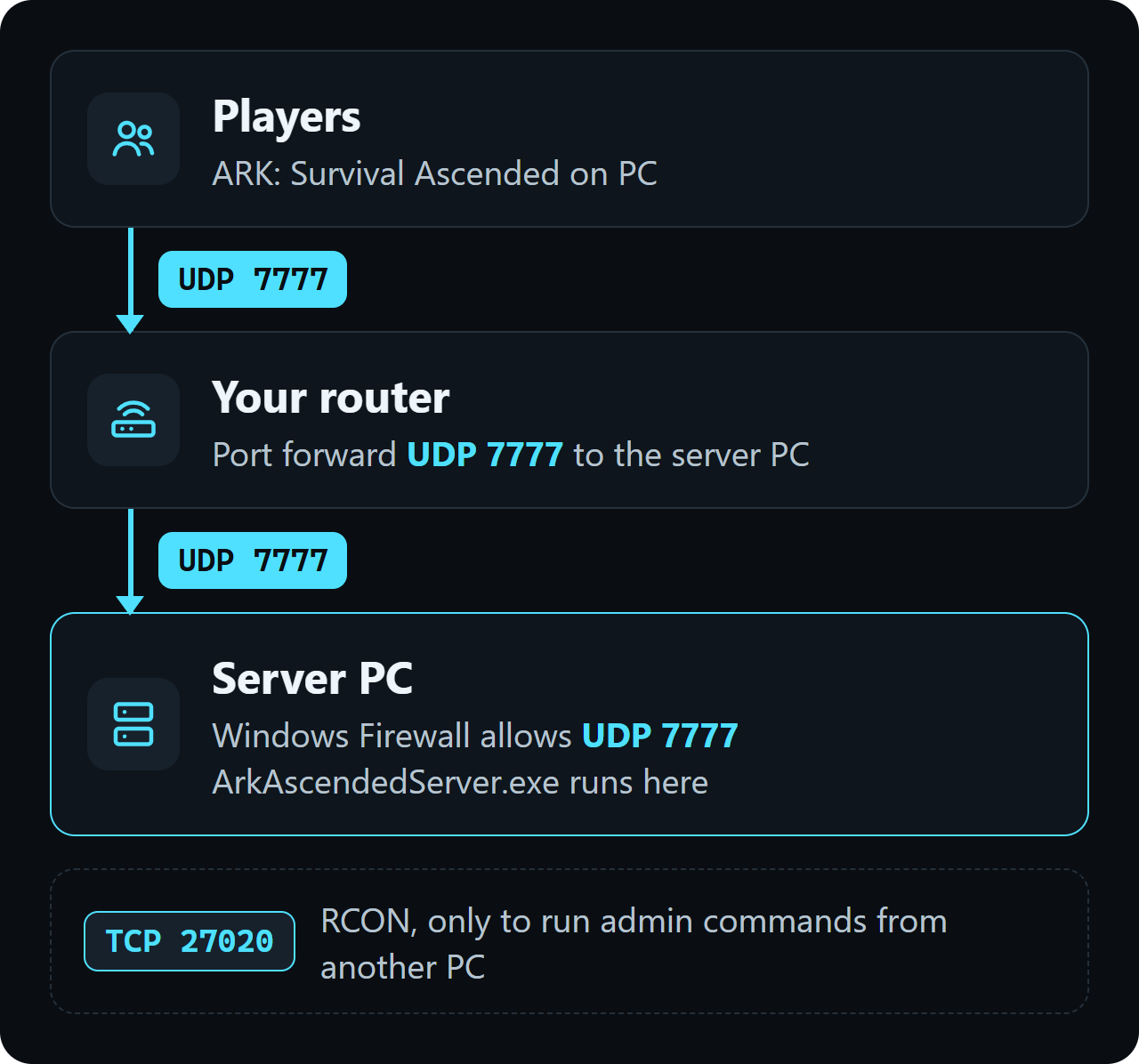
Players connect over UDP 7777. If friends outside your home will join, you forward that port on your router (see Ports and firewall below).
Checked on ARK version 96.6, 30 October 2026.
Install the server
1. Download SteamCMD from Valve and unzip it to C:\steamcmd.
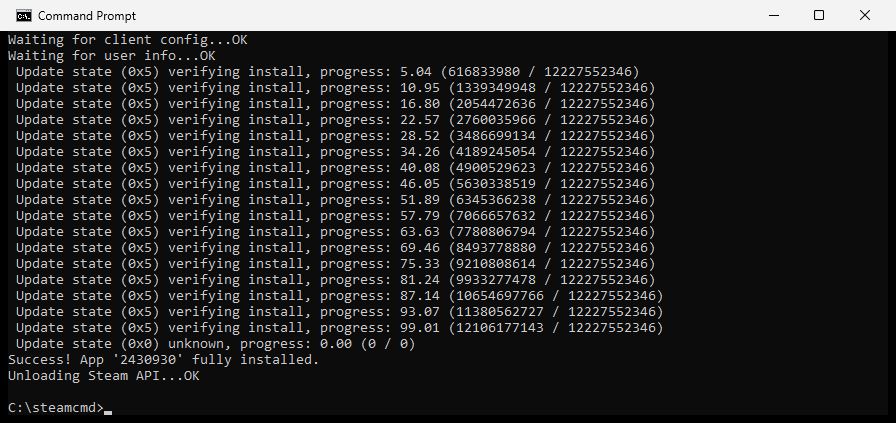
2. Open PowerShell or Command Prompt and download the server to C:\asa-server:
C:\steamcmd\steamcmd.exe +force_install_dir C:\asa-server +login anonymous +app_update 2430930 validate +quit
3. Save these lines as start-server.bat next to SteamCMD, change the name and the two passwords, and double-click it to start the server:
@echo off cd /d C:\asa-server\ShooterGame\Binaries\Win64 start "" ArkAscendedServer.exe TheIsland_WP?listen?SessionName="YOUR-SERVER-NAME"?ServerPassword=YOUR-JOIN-PASSWORD?RCONEnabled=True?RCONPort=27020?ServerAdminPassword=YOUR-ADMIN-PASSWORD -port=7777 -WinLiveMaxPlayers=20
The map comes first, then the ?options with no spaces between them, then the -options. Keep ?ServerAdminPassword last in the ? part. The server writes these options into GameUserSettings.ini, so set each one in a single place.
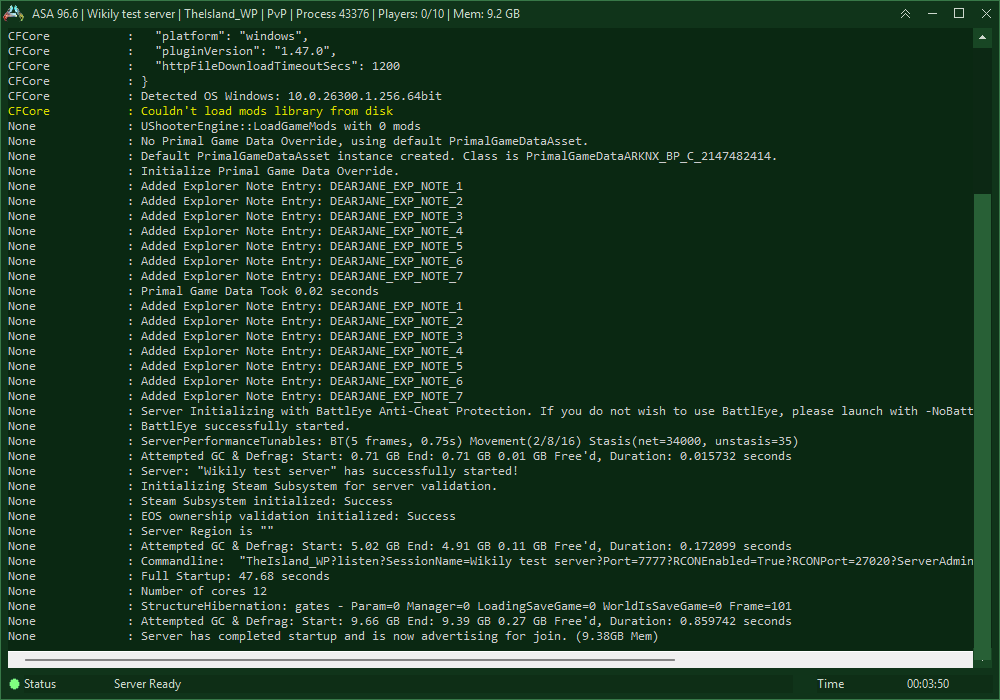
Stop the server with DoExit (in the game: cheat DoExit, or over RCON). It saves and closes within a minute. Closing the window stops the server without saving.
Maps
Every map is in the same 12.2 GB download. To change the map, swap TheIsland_WP in start-server.bat for its name here:
| Map | Name in the start line | Paid map |
|---|---|---|
| The Island | TheIsland_WP | No |
| Scorched Earth | ScorchedEarth_WP | No |
| The Center | TheCenter_WP | No |
| Aberration | Aberration_WP | No |
| Extinction | Extinction_WP | No |
| Ragnarok | Ragnarok_WP | No |
| Valguero | Valguero_WP | No |
| Genesis: Part 1 | Genesis_WP | No |
| Astraeos | Astraeos_WP | Yes |
| Lost Colony | LostColony_WP | Yes |
Ports and firewall
Players connect on UDP 7777, or the port set with -port=. ?Port= in the ? part is ignored. RCON uses TCP 27020 and is only needed to run admin commands from another PC. The server also opens UDP 27015 for Steam, and does not use UDP 7778.
Let the game port through Windows Firewall, in PowerShell as administrator:
New-NetFirewallRule -DisplayName "ARK server" -Direction Inbound -Protocol UDP -LocalPort 7777 -Action Allow
For players outside your home network, forward UDP 7777 on your router to the local IP address of the server PC. A second server on the same PC needs its own -port= and RCONPort, for example -port=7779 and RCONPort=27021.
Server settings
The first start writes the settings files to C:\asa-server\ShooterGame\Saved\Config\WindowsServer. Stop the server before you edit them: a running server writes its own values back.
| Setting | Default | What it does |
|---|---|---|
| ServerPVE | False | True turns off damage between players and to their bases. |
| XPMultiplier | 1 | XP from everything. 2 gives double XP. |
| TamingSpeedMultiplier | 1 | Higher tames faster. |
| HarvestAmountMultiplier | 1 | Resources per hit. |
| OverrideOfficialDifficulty | 0 | 5 matches official servers: wild creatures up to level 150. |
| DayCycleSpeedScale | 1 | Speed of the day and night cycle. Lower is slower. |
| AutoSavePeriodMinutes | 15 | Minutes between autosaves. |
| MaxTamedDinos | 5000 | Tames allowed on the whole server. |
| ShowMapPlayerLocation | True | Your own position on the map. |
| AllowThirdPersonPlayer | True | Third-person view. |
| ServerCrosshair | True | The crosshair. |
[ServerSettings] ServerPVE=False XPMultiplier=1 TamingSpeedMultiplier=1 HarvestAmountMultiplier=1 OverrideOfficialDifficulty=5 AutoSavePeriodMinutes=15 ShowMapPlayerLocation=True AllowThirdPersonPlayer=True ServerCrosshair=True
Game.ini is not created on the first start. Make it next to GameUserSettings.ini. Breeding settings go here:
| Setting | Default | What it does |
|---|---|---|
| MatingIntervalMultiplier | 1 | Wait between matings. 0.5 halves it. |
| EggHatchSpeedMultiplier | 1 | Higher hatches eggs faster. |
| BabyMatureSpeedMultiplier | 1 | Higher grows babies faster. |
| BabyCuddleIntervalMultiplier | 1 | Time between imprint cuddles. Lower means more often. |
[/Script/ShooterGame.ShooterGameMode] MatingIntervalMultiplier=0.5 EggHatchSpeedMultiplier=2 BabyMatureSpeedMultiplier=2 BabyCuddleIntervalMultiplier=0.5
| Option | What it does |
|---|---|
| ?SessionName= | Server name in the list. |
| -port= | Game port, 7777 by default. |
| -WinLiveMaxPlayers= | Player limit. Written into GameUserSettings.ini as MaxPlayers. |
| ?ServerPassword= | Password to join. Leave it out for an open server. |
| ?ServerAdminPassword= | Password for enablecheats and RCON. Keep it last in the ? part. |
| -mods= | CurseForge project IDs of the mods, separated by commas. |
| -clusterID= | Lets players move between your servers with the same cluster ID. |
| -NoBattlEye | Starts without BattlEye anti-cheat. It is on by default. |
Admin and RCON
In the game, open the console with the key left of 1 (~ on a US keyboard) and type enablecheats followed by the ServerAdminPassword. Admin commands then start with cheat, for example cheat SaveWorld.
enablecheats YOUR-ADMIN-PASSWORD cheat SaveWorld
With RCONEnabled=True, any RCON tool connects to the server's IP on TCP 27020 with the ServerAdminPassword. Useful commands: ListPlayers, SaveWorld, Broadcast <text> and DoExit, which saves the world and stops the server.
Mods
ASA servers load mods from CurseForge. Find a mod on CurseForge, copy its Project ID and add it to the start line. The server downloads the mods when it starts, and players download them when they join.
start "" ArkAscendedServer.exe TheIsland_WP?listen?SessionName="YOUR-SERVER-NAME"?ServerAdminPassword=YOUR-ADMIN-PASSWORD -port=7777 -WinLiveMaxPlayers=20 -mods=FirstProjectID,SecondProjectID
Join the server
1. In the main menu, open Join Game. 2. Switch to Unofficial and tick Show Player Servers. 3. Search for the server name, select it and join. A password-protected server asks for the ServerPassword.
On PC you can also connect by address: open the console in the main menu and type open followed by the IP and port.
open YOUR-SERVER-IP:7777
Saves, backups and updates
Each map saves to its own folder: C:\asa-server\ShooterGame\Saved\SavedArks\TheIsland_WP. The server saves every AutoSavePeriodMinutes and on SaveWorld or DoExit.
Next to TheIsland_WP.ark it keeps dated copies such as TheIsland_WP_30.10.2026_21.27.05.arkrbf and a TheIsland_WP_AntiCorruptionBackup.bak.
To make a backup, stop the server with DoExit and copy the SavedArks and Config folders. To update, stop it the same way and run the SteamCMD line again: it keeps your saves and settings.
Common problems
My server is not in the list
Tick Show Player Servers under Unofficial. Wait until the console says the server is advertising for join, and check that the server and the game have the same version.
Friends get a connection timeout
Forward UDP 7777 (not TCP) to the server PC's local IP and add the firewall rule. Players on your own network connect with the local IP instead.
My ini changes are gone
The server was running while you edited. Stop it, edit the file, start it again.
The player limit does not change
Set the limit with -WinLiveMaxPlayers= in the start line. The server writes it into GameUserSettings.ini as MaxPlayers.
Players cannot join after an ARK update
Steam updated the game but not the server. Stop the server and run the SteamCMD line again.
Questions
Do I need to own ARK: Survival Ascended to host a server?
No. SteamCMD downloads the server with an anonymous login. Only the players need the game.
Which port do I forward for an ASA server?
UDP 7777, set with -port= in the start line. RCON uses TCP 27020 and only needs to be reachable to run admin commands from another PC.
How much RAM does an ASA server need?
The Island with nobody online uses about 9.5 GB after a start of 3 to 4 minutes. Each map you run is its own server with its own memory.
Can I run an ASA server on Linux?
There is no native Linux version, but the Windows server runs on Linux under Proton or Wine. Community Docker images set this up, and many of them start the server with -NoBattlEye.
How do I add mods to my ASA server?
Add the CurseForge project IDs to the start line with -mods=, separated by commas. The server downloads them when it starts, and players when they join.
How do I become admin on my ASA server?
Open the console in the game and type enablecheats followed by the ServerAdminPassword from the start line.