X-Spino
KreaturVariante
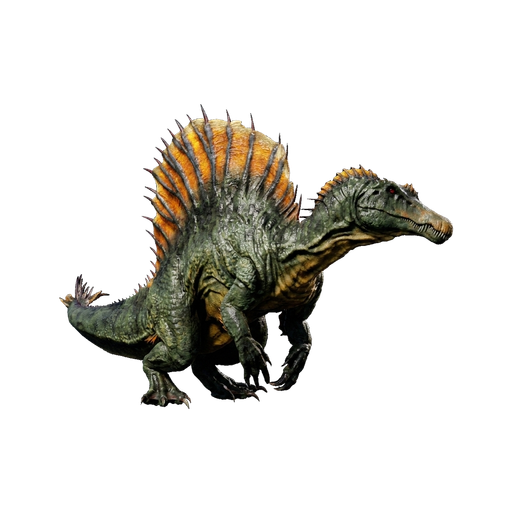
Kreaturenbefehle
Spawn-Befehle für X-Spino
Gezähmt auf Level 150 spawnen
ErweitertWeitere Befehle
- Wild spawnenSummon erzeugt einen wilden X-Spino.
admincheat summon Bog_Spino_Character_BP_C - Wild auf Level 150 spawnenSpawnDino erzeugt einen wilden X-Spino auf Level 150.
admincheat SpawnDino "Blueprint'/Game/Genesis/Dinos/BiomeVariants/Bog_Spino/Bog_Spino_Character_BP.Bog_Spino_Character_BP'" 500 0 0 150 - Gezähmt auf Level 150 spawnenGMSummon erzeugt einen gezähmten X-Spino auf Level 150.
admincheat GMSummon Bog_Spino_Character_BP_C 150 - Spino Saddle gebenGiveItem legt den Sattel direkt in dein Inventar.
admincheat GiveItem "Blueprint'/Game/PrimalEarth/CoreBlueprints/Items/Armor/Saddles/PrimalItemArmor_SpinoSaddle.PrimalItemArmor_SpinoSaddle'" 1 0 0 - Gezähmt auf Level 150 mit Sattel spawnenFüge beide Befehle nacheinander ein - der erste spawnt einen gezähmten X-Spino auf Level 150, der zweite gibt dir den Sattel.
admincheat GMSummon Bog_Spino_Character_BP_C 150 | admincheat GiveItem "Blueprint'/Game/PrimalEarth/CoreBlueprints/Items/Armor/Saddles/PrimalItemArmor_SpinoSaddle.PrimalItemArmor_SpinoSaddle'" 1 0 0 - Anvisierte Kreatur zwangszähmenForceTame zähmt jeden Dino und macht ihn ohne Sattel reitbar, während DoTame nur zähmbare Kreaturen zähmt. Beide zähmen die Kreatur, die du gerade ansiehst.
admincheat ForceTame - Anvisierte Kreatur zähmen
admincheat DoTame - Erfahrung hinzufügenAddExperience levelt den Dino, den du reitest, und GiveExpToTarget levelt die Kreatur/den Spieler, den du ansiehst.
admincheat AddExperience <Amount> <From Tribe> <Prevent Sharing With Tribe> - Dem Ziel Erfahrung geben
admincheat GiveExpToTarget <Amount> <From Tribe> <Prevent Sharing With Tribe> - Anvisierte Kreatur tötenTötet die Kreatur oder den Spieler, die/den Sie gerade ansehen.
admincheat Kill - Alle Dinos übernehmenÜberträgt den Besitz aller Dinosaurier, die dem Zielspieler oder -stamm gehören, auf Ihren aktuellen Stamm. Sie müssen einen Dino ansehen, der dem Zielspieler/-stamm gehört.
admincheat TakeAllDino

Mehr über X-Spino
The spawn command tool lets you create console commands for spawning a X-Spino with your desired settings. Multiple variants are available - use the selector to pick the version you want.
ARK supports several command types: "Summon" spawns a random-level creature at your crosshair, "SpawnDino" lets you set coordinates and level, and "GMSummon" spawns a force-tamed creature. For a ready-to-ride X-Spino, GMSummon is the way to go. Open the admin console with Tab (PC) or through the pause menu on console. Admin privileges are required.
ARK: Survival Ascended features the X-Spino as a tamable, carnivore creature that survivors will encounter in the wild. It falls within the Variant classification.
Its base Melee Damage sits at 100%, giving it solid damage output. Health-wise, the X-Spino sits at 700 base, making it quite durable. Its base Stamina of 350 gives it solid stamina reserves. A base Weight of 350 means generous inventory space.
To tame the X-Spino, you need to knock it unconscious using torpor weapons, then feed it while it's down. Feed it Exceptional Kibble for the fastest tame and highest effectiveness bonus.
After taming, the X-Spino is valued for its harvesting efficiency, collecting key resources faster than most tools. Breeding produces fertilized eggs that hatch within a 30°C–32°C temperature window. Killing a wild X-Spino yields 60 base XP. It can be cloned at a Cloning Chamber for 0.67 Element plus 0.01 Element per level.