Tek Raptor
KreaturVariante
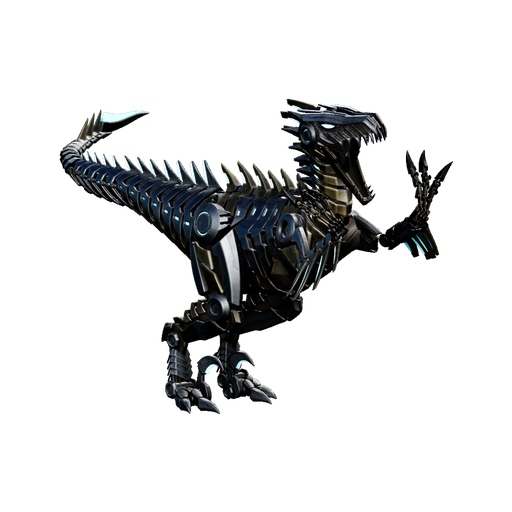
Kreaturenbefehle
Spawn-Befehle für Tek Raptor
Gezähmt auf Level 150 spawnen
ErweitertWeitere Befehle
- Wild spawnenSummon erzeugt einen wilden Tek Raptor.
admincheat summon BionicRaptor_Character_BP_C - Wild auf Level 150 spawnenSpawnDino erzeugt einen wilden Tek Raptor auf Level 150.
admincheat SpawnDino "Blueprint'/Game/PrimalEarth/Dinos/Raptor/BionicRaptor_Character_BP.BionicRaptor_Character_BP'" 500 0 0 150 - Gezähmt auf Level 150 spawnenGMSummon erzeugt einen gezähmten Tek Raptor auf Level 150.
admincheat GMSummon BionicRaptor_Character_BP_C 150 - Raptor Saddle gebenGiveItem legt den Sattel direkt in dein Inventar.
admincheat GiveItem "Blueprint'/Game/PrimalEarth/CoreBlueprints/Items/Armor/Saddles/PrimalItemArmor_RaptorSaddle.PrimalItemArmor_RaptorSaddle'" 1 0 0 - Gezähmt auf Level 150 mit Sattel spawnenFüge beide Befehle nacheinander ein - der erste spawnt einen gezähmten Tek Raptor auf Level 150, der zweite gibt dir den Sattel.
admincheat GMSummon BionicRaptor_Character_BP_C 150 | admincheat GiveItem "Blueprint'/Game/PrimalEarth/CoreBlueprints/Items/Armor/Saddles/PrimalItemArmor_RaptorSaddle.PrimalItemArmor_RaptorSaddle'" 1 0 0 - Anvisierte Kreatur zwangszähmenForceTame zähmt jeden Dino und macht ihn ohne Sattel reitbar, während DoTame nur zähmbare Kreaturen zähmt. Beide zähmen die Kreatur, die du gerade ansiehst.
admincheat ForceTame - Anvisierte Kreatur zähmen
admincheat DoTame - Erfahrung hinzufügenAddExperience levelt den Dino, den du reitest, und GiveExpToTarget levelt die Kreatur/den Spieler, den du ansiehst.
admincheat AddExperience <Amount> <From Tribe> <Prevent Sharing With Tribe> - Dem Ziel Erfahrung geben
admincheat GiveExpToTarget <Amount> <From Tribe> <Prevent Sharing With Tribe> - Anvisierte Kreatur tötenTötet die Kreatur oder den Spieler, die/den Sie gerade ansehen.
admincheat Kill - Alle Dinos übernehmenÜberträgt den Besitz aller Dinosaurier, die dem Zielspieler oder -stamm gehören, auf Ihren aktuellen Stamm. Sie müssen einen Dino ansehen, der dem Zielspieler/-stamm gehört.
admincheat TakeAllDino

Mehr über Tek Raptor
The spawn command tool lets you create console commands for spawning a Tek Raptor with your desired settings. Multiple variants are available - use the selector to pick the version you want.
Command options include Summon (random level, at crosshair), SpawnDino (precise coords and level), and GMSummon (force-tamed at specified level). For a ready-to-ride Tek Raptor, GMSummon is the way to go. Open the admin console with Tab (PC) or through the pause menu on console. Admin privileges are required.
ARK: Survival Ascended features the Tek Raptor as a tamable, carnivore creature that survivors will encounter in the wild. It belongs to the Variant category.
The Tek Raptor has 200 base Health - relatively fragile. Its base Melee Damage sits at 100%, giving it respectable melee power. Its base Stamina of 150 gives it moderate endurance. It carries 140 base Weight - a reasonable inventory size.
To tame the Tek Raptor, you need to knock it unconscious using torpor weapons, then feed it while it's down. Feed it Simple Kibble for the fastest tame and highest effectiveness bonus.
Once tamed, the Tek Raptor is a versatile tame with a balanced stat spread, useful in a variety of roles. Breeding produces fertilized eggs that hatch within a 20°C–28°C temperature window. A wild Tek Raptor is worth 3 base experience when killed. It can be cloned at a Cloning Chamber for 0.23 Element plus 0.01 Element per level.