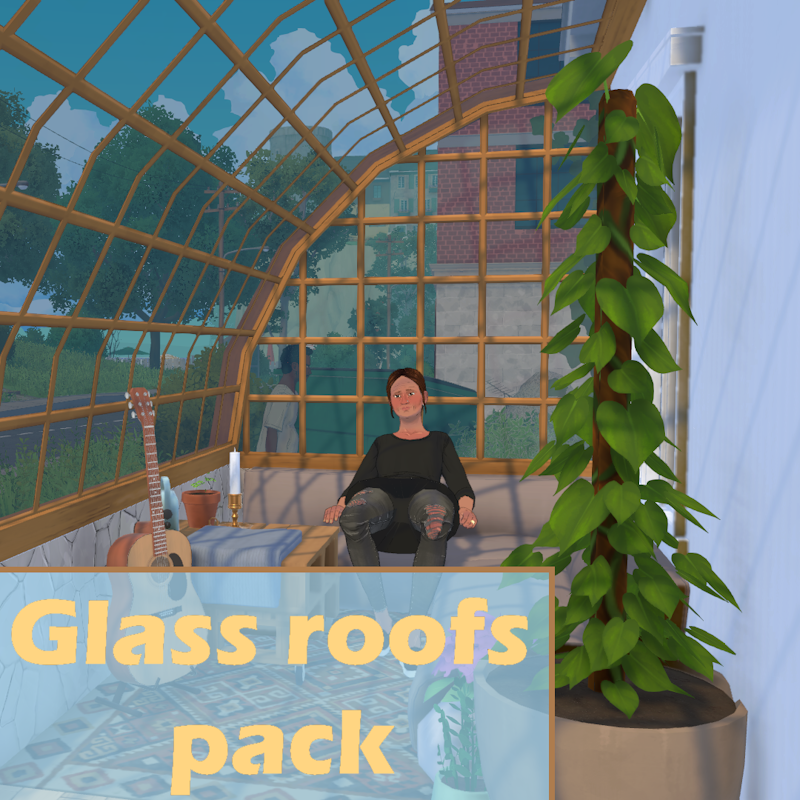
Glass roofs pack

工作坊數據
累計訂閱者
目前訂閱者
累計收藏
瀏覽次數
檔案大小
最後更新
發布日期
螢幕擷圖

模組說明
Switch your boring ceiling covered in star-shaped glow-in-the-dark stickers for the real thing and watch the beautiful starry sky from within your comfy sunro... well... your moonroom !
Four types of slopes are included in this mod pack
- Flat
- Straight
- Rounded
- Ogival
Each comes with two set of corners and a matching window (the last two also have a set of XL variation, but their texture is quite buggy...) and every model is also recolorable with four different glass texture: no pattern, square cut-outs, rectangular cut-outs, and vertical rows. They're all resizable and works like your usual roofs.
This mod is best used with my Hole modpack, which can help hide parts of the wall above the window to achieve the result seen in the thumbnail. You can also use this mod alongside my Wall-less roofs modpack
Since the mod use graymask texture, you MUST put the mod into your local content folder to work properly as shown in the mod's picture gallery. The folder is usually located under C:\Users\[YourUsername]\AppData\LocalLow\Paralives\Paralives. If you don't do this, you'll be greeted with a solid white texture instead of glass. As for mac users, since I don't really know how a Mac computer works, you can find your local mod folder by going into the custom content menu of the game and create a new mod (give it a name like "local mod folder shortcut" or anything that will make you find it with ease). Then, you should see row of icons next to the thumbnail: click on the folder icon and it will lead you to your mod. Go into the parent folder and *voilà*, you're in your local mod folder.
If you want to find the folder where the mod has been automatically downloaded in, click on the folder icon of my mod, it will lead you right where it is.
Known bug
- After first launch of the mode, the texture might not show up immediately. Restarting the game usually solves this.
- The texture tilling is a bit messed up sometimes, but since there isn't clear documentation about this tool, I haven't been able to fully correct the problem.
- You can't pick the glass texture directly in the catalog, you must change it after buying the slope.
Enjoy !
由模組作者在 Steam 工作坊撰寫,以原文語言顯示。